

I have proofread and edited a lot of copy during my career. Do I love it? Yes!
It isn’t everyone’s cup of tea, and as they would say up North, “There’s nowt wrong with that”. It can be useful to get a copywriter to do that job for you at a relatively low price.
It is just as important to have well-edited copy as it is to have good content. If you have interesting, sales-converting words on your website, you’re unlikely to achieve your end goal if the content does not read right.
If you do decide to knuckle down and do it yourself, here are some useful tips and tools.
Grammarly & Hemingway
I get the impression that people have very strong opinions about these two editing tools. I like them both and appreciate that they provide value in different ways.

The free version of Grammarly is fantastic if you want a basic spelling and grammar check. You paste your text into the web page, set your goals depending on things like how formal your copy should sound and, voila! The mistakes are underlined in red, allowing you to click on them to see what needs changing and either accept or dismiss them.
It also tells you why they are highlighted which can be useful for learning purposes, and offers alternative synonyms by clicking on the word (my favourite function).
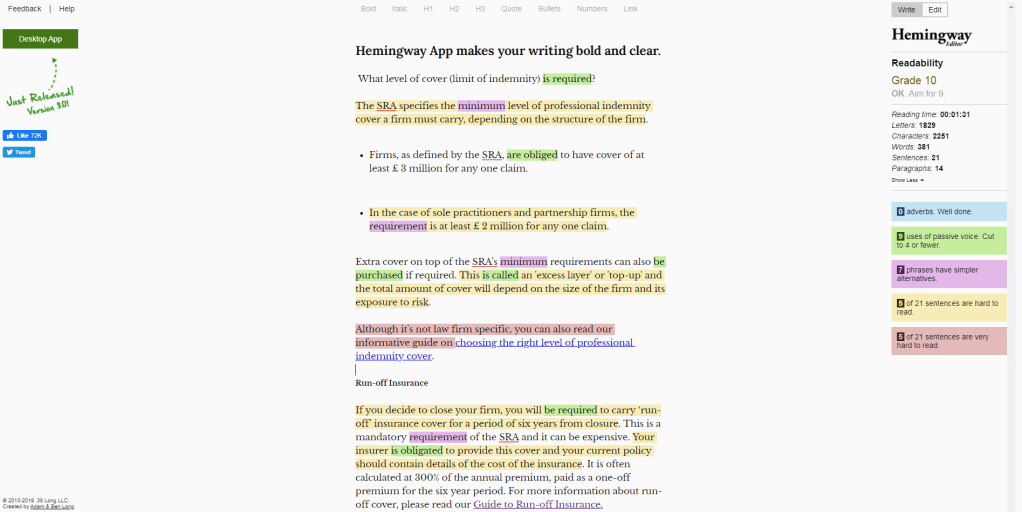
If you’re already quite good with spelling and grammar and are on the hunt for something a bit more technical, then Hemingway is worth exploring. Like Grammarly, it has a free version which works fine for me.
Once you have pasted your copy into the web page, it will highlight your text in different colours alongside a breakdown of what they mean. It will point out things like hard-to-read sentences, use of passive voice, too many adverbs etc.
In summary, both tools can be used together to make sure your copy reads well.
Proofreading Checklist
Once you have put your copy through Grammarly and/or Hemingway, you should start on your proofreading checklist:
- Print it out – I’m all for saving the environment, so don’t print out your project if it’s hundreds of pages long. If there are only a few pages, I find it useful to have a hard copy so that I can read through it and make notes.
- Cut out wordy copy – If you haven’t already done this in Grammarly/Hemingway, then make sure you look for ways to cut down your copy. You want to tell a story through your writing, but that does not mean you need several paragraphs to make one point.
- Check your facts – If you have included facts and stats in your copy, it’s always worth double-checking them again. I once came across a global company that had written “million” instead of “billion” on its end of year financial results. I picked up on this in the proofreading stage, but it shows that these things happen more often than you think. This also applies for names. If you’re writing a press release, make sure all company and employee names are spelled correctly.
- Read it out loud – You may want to find a private room for this (for the sake of your co-workers) or mutter quietly under your breath (which can also make you look very strange). Reading your text out loud will help you to ensure that your copy flows well and allows you to pick up on any hidden mistakes or long sentences.
And that’s it my friends! This is an excellent system if you decide you want to go down the do it yourself route.
Alternatively, if the thought of doing this yourself makes you shudder, or you simply want to spend the time doing something else (like running your business), then I would love to have a chat.
 Laura Bracher